

Choosing Google ads takes knowledge and skill.
Here is a rundown on how to do it, AI ad creation prompts, and some videos to help.
Type of Google Ad Campaigns
Google offers several different ways to reach its users. You can choose any one of these per Google Campaign.
| Ad Type | Location | Best For | Cost Per Lead |
|---|---|---|---|
| Search Ads | Google Search results | Keyword-targeted webpage promotion | $$$ |
| Display Ads | Websites, apps, Google properties | Brand awareness across formats | $$ |
| Shopping Ads | Google Shopping, SERP, Images, Maps | Physical product sales | $ |
| Video Ads | YouTube, partner networks | Video content promotion | $ |
| App Ads | Play Store, SERP, YouTube, Discover | App promotion and installs | $$$ |
| Discovery Ads | Discover feed, YouTube, Gmail | Visual automated advertising | $ |
| Local Services | SERP and Google Maps | Location-based services | $$$ |
| Performance Max | All Google channels | Cross-channel optimization | $$$$ |
| Smart Ads | SERP, Maps, YouTube, Gmail | Goal-focused campaigns | $$$ |
1. Search Ads
- Location: Google Search results
- Best For: Promoting webpages related to targeted keywords
Search Ads are text-based advertisements that appear on the Search Engine Results Page (SERP) when users search for specific keywords. These ads are highly targeted, showing up at the exact moment users express interest in a product or service. They rely on a Quality Score system, which evaluates the ad’s relevance, expected click-through rate (CTR), and landing page quality. Advertisers bid for placement, with higher budgets and better Quality Scores increasing visibility.
2. Display Ads
- Location: Websites, apps, and Google properties in the Display Network
- Best For: Building awareness in new markets across various content formats
Display Ads are visually oriented advertisements that appear on over 35 million websites and apps, as well as Google properties like Gmail and YouTube. They use user behavior and website content to target audiences effectively. While they may have lower CTRs compared to Search Ads, they excel at spreading brand awareness through banners, sidebars, or embedded visuals.
3. Shopping Ads
- Location: Google Shopping, SERP, Images, Maps, and search partner results
- Best For: Selling physical products listed in Google Merchant Center
Shopping Ads showcase product images, prices, and ratings directly within search results or across Google platforms. These ads auto-populate using data from the Merchant Center and are ideal for e-commerce businesses looking to drive sales. They appear prominently in search results as carousels or individual listings.
4. Video Ads
- Location: YouTube (before, during, or after videos) and across the Google Video Partners network
- Best For: Promoting video content or engaging users with dynamic video ads
Video Ads are hosted primarily on YouTube and come in multiple formats:
- Skippable/non-skippable in-stream ads
- Bumper ads (short six-second non-skippable ads)
- In-feed ads (promoted videos in search results)
These ads are highly engaging and can also appear on third-party apps and websites via Google’s Video Partners network.
5. App Ads
- Location: Play Store (search results and suggestions), SERP, YouTube feeds, Discover feed, and search partner networks
- Best For: Promoting mobile apps (installs, engagement, or pre-registration)
App Ads streamline the process of advertising apps by using content from the app’s Play Store listing. They target users based on campaign goals like installs or engagement. These ads are especially effective for Android apps but also work for iOS.
6. Discovery Ads
- Location: Google Discover feed, YouTube homepage/Watch Next feeds, Gmail Promotions/Social tabs
- Best For: Targeting purchase-ready users with visually appealing automated ads
Discovery Ads leverage AI to create visually rich campaigns tailored to user intent. They appear seamlessly across platforms like Discover and Gmail tabs. By targeting users already in a browsing mindset, these ads often reach audiences closer to a purchasing decision.
7. Local Services Ads
- Location: Google SERP and Google Maps
- Best For: Advertising geographically specific services to local leads
Local Services Ads connect businesses with local customers through verified listings that include trust badges like “Google Guaranteed.” These ads prioritize calls or messages from potential customers while ensuring advertisers meet Google’s licensing and background check requirements.
8. Performance Max Ads
- Location: All Google advertising channels
- Best For: Cross-channel campaigns optimized automatically by AI
Performance Max campaigns use machine learning to optimize ad placements across all Google properties (e.g., YouTube, Maps, Gmail). Advertisers provide assets (images, headlines) and set goals like sales or leads; Google’s AI handles the rest. This type is ideal for businesses seeking broad reach without managing multiple campaigns.
9. Smart Ads
- Location: SERP, Maps, YouTube, Gmail, and search partner sites
- Best For: Goal-centric campaigns prioritizing outcomes over specific ad channels
Smart Ads offer a simplified approach to advertising by focusing on campaign-wide goals like lead generation or website traffic. Advertisers provide keyword themes rather than specific keywords, allowing Google to automate ad placements across multiple channels effectively.
Each ad type serves specific business goals—whether it’s driving immediate sales through Shopping Ads or building brand awareness with Display Ads—making it essential to choose the one that aligns best with your strategy and audience.
Campaign structure & hierarchy
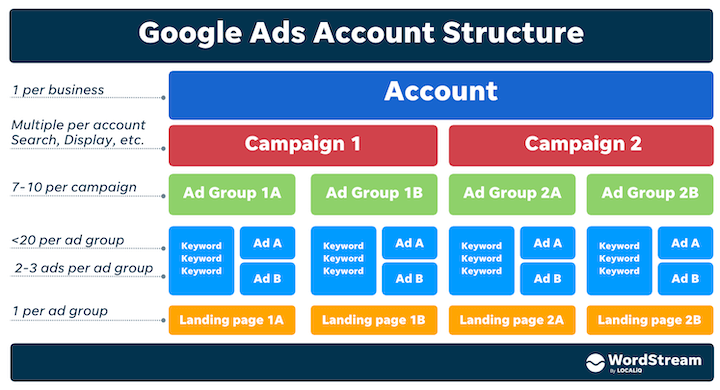
The Structure and Hierarchy of Google Ads Campaigns
Google Ads is organized into a hierarchical structure with distinct levels: Account, Campaigns, Ad Groups, Keywords, Ads, and Landing Pages. Each level plays a critical role in organizing and optimizing ad performance. Below is a detailed breakdown of each level with examples tailored to a web design agency.
1. Account Level
This is the topmost layer, encompassing all campaigns, billing information, and overarching settings. An account typically represents a single business or organization.
Key Features:
- Unique email address and password for access.
- Shared billing information across all campaigns.
- Conversion tracking settings apply to all campaigns within the account.
Example:
A web design agency creates an account named “Creative Web Solutions” to manage its advertising efforts for services like website development, SEO, and branding.
2. Campaign Level
Campaigns are the second layer, where you define the broader objectives of your advertising efforts. Each campaign focuses on a specific goal, such as lead generation or brand awareness, and includes settings like budget, bidding strategy, targeting options (location, language), and campaign type (e.g., Search, Display).
Key Features:
- Separate campaigns for different services or goals.
- Budget allocation at the campaign level.
- Targeting options like geographic location or device type.
Example:
Campaign 1: "Web Design Services"
  - Goal: Lead generation
  - Budget: $500/month
  - Targeting: United States, English speakers
  - Campaign Type: Search Ads
3. Ad Group Level
Ad groups organize ads and keywords under a common theme within a campaign. This structure allows for better targeting and relevance by grouping related services or products.
Key Features:
- Each ad group contains closely related keywords and ads.
- Bids can be set at the ad group level.
- Allows thematic segmentation for better ad relevance.
Example:
Campaign: "Web Design Services"
  Ad Group 1: "Small Business Websites"
    - Keywords: "affordable web design," "small business website design"
    - Ads: Focused on budget-friendly web design services.
  Ad Group 2: "E-commerce Websites"
    - Keywords: "e-commerce website development," "online store design"
    - Ads: Highlight expertise in building online stores.
4. Keyword Level
Keywords trigger your ads when users search for terms that match your chosen phrases. Selecting the right keywords ensures your ads reach the intended audience.
Key Features:
- Keywords are grouped within ad groups.
- Match types include Broad Match, Phrase Match, Exact Match, and Negative Keywords.
- Keywords influence Quality Score and Ad Rank.
Example:
Ad Group: "Small Business Websites"
  Keywords:
    - Broad Match: affordable web design
    - Phrase Match: "small business website design"
    - Exact Match: [custom websites for small businesses]
    - Negative Keyword: free website templates
5. Ad Level
Ads are the actual content users see when they search on Google or browse websites in the Display Network. Ads must align with their associated keywords to achieve high relevance and Quality Score.
Key Features:
- Each ad group should contain 2–3 ads to allow A/B testing.
- Ads include headlines, descriptions, URLs, and extensions (e.g., callouts or sitelinks).
- Responsive Search Ads dynamically adjust based on user queries.
Example:
Ad Group: "Small Business Websites"
  Ad 1:
    Headline: "Affordable Web Design for Small Businesses"
    Description: "Custom websites starting at $499. Perfect for small businesses. Get a free consultation today!"
    URL: www.creativewebsolutions.com/small-business-websites
  Ad 2:
    Headline: "Custom Small Business Websites"
    Description: "Professional web design tailored to your needs. Affordable pricing & fast delivery."
    URL: www.creativewebsolutions.com/small-business-websites
6. Landing Page Level
The landing page is where users are directed after clicking an ad. It must be highly relevant to the ad content and keywords to ensure conversions and maintain a high Quality Score.
Key Features:
- One landing page per ad group for maximum relevance.
- Should include clear calls-to-action (CTAs) aligned with the ad’s intent.
- Optimized for mobile devices and fast loading speeds.
Example Landing Page:
For the ad promoting affordable web design services:
URL: www.creativewebsolutions.com/small-business-websites

Landing Page Content:
  - Headline: "Affordable Web Design for Small Businesses"
  - Subheadline: "Custom websites starting at $499."
  - CTA Button: "Get Your Free Consultation Today!"
- Features Section: Highlight benefits like fast delivery, mobile optimization, and SEO-friendly designs.| Level | Purpose | Example (Web Design Agency) |
|---|---|---|
| Account | Overarching framework | Account Name: Creative Web Solutions |
| Campaign | Broad objective | Campaign Name: Web Design Services |
| Ad Group | Thematic segmentation | Ad Groups: Small Business Websites, E-commerce Websites |
| Keywords | Trigger ads | Keywords in Small Business Websites Ad Group: affordable web design, small business website design |
| Ads | User-facing content | Ad Headline: Affordable Web Design for Small Businesses |
| Landing Page | Conversion-focused destination | URL: www.creativewebsolutions.com/small-business-websites |
By following this structured approach, you can create well-organized Google Ads campaigns that maximize relevance, improve Quality Scores, reduce costs-per-click (CPC), and drive conversions effectively.
Citations:
[1] https://www.heroesofdigital.com/sem/structure-google-ads-account/
[2] https://leadsbridge.com/blog/google-ads-campaign-structure/
[3] https://www.saffronedge.com/blog/google-ad-structure/
[4] https://www.wordstream.com/blog/ws/2022/05/10/google-ads-account-structure
[5] https://www.kreativagroup.com/post/what-are-the-different-google-ads-campaign-structures
[6] https://www.everywheremarketer.com/blog/google-ad-groups
[7] https://support.google.com/google-ads/answer/1704396?hl=en
[8] https://www.youtube.com/watch?v=QLQ5XIx1ixs
[9] https://www.datafeedwatch.com/blog/google-ads-campaign-structures
[10] https://www.talentport.com/performance/google-ads-campaigns
Keywords
Keywords are at the heart of search ads.
First, lets discuss keyword match types.
1. Broad Match
- Syntax: Enter the keyword without any special symbols (e.g.,
small business website design). - Reach: Broad match has the widest reach, allowing your ad to appear for searches that are related to the meaning of your keyword, even if they don’t contain the exact words. This includes synonyms, alternate phrasing, and related concepts.
- Relevance: While it maximizes visibility, broad match often results in less relevant traffic, as it casts a very wide net. It’s best used when paired with negative keywords to filter out irrelevant searches.
Example for a Web Design Agency:
Keyword: small business website design
Potential Searches Triggered:
- "affordable web design"
- "website creation services"
- "business website help"
- "cheap website templates"
Broad match might attract users looking for free or DIY options, which may not align with your service offering.
2. Phrase Match
- Syntax: Enclose the keyword in quotation marks (e.g.,
"small business website design"). - Reach: Phrase match narrows the scope compared to broad match. Ads appear for queries that include the meaning of your keyword, often with additional words before or after it. The search query must preserve the intent of the keyword.
- Relevance: This type strikes a balance between reach and relevance, making it ideal for targeting users who are more likely to convert.
Example for a Web Design Agency:
Keyword: "small business website design"
Potential Searches Triggered:
- "affordable small business website design"
- "small business website design services"
- "custom small business website design"
Phrase match ensures that users searching for related but intent-aligned terms will see your ad, such as those looking specifically for professional services.
3. Exact Match
- Syntax: Place the keyword in square brackets (e.g.,
[small business website design]). - Reach: Exact match has the narrowest reach. Ads only show for queries that exactly match the keyword or very close variants (e.g., singular/plural forms, misspellings) with the same intent.
- Relevance: This type provides the highest relevance and control over who sees your ad, but it limits visibility significantly.
Example for a Web Design Agency:
Keyword: [small business website design]
Potential Searches Triggered:
- "small business website design"
- "small business websites design"
- "business website design for small companies"
Exact match ensures that only users searching explicitly for your service will see your ad, reducing wasted clicks from irrelevant traffic.
| Match Type | Syntax | Reach | Relevance | Example Searches for Keyword: “Small Business Website Design” |
|---|---|---|---|---|
| Broad Match | keyword | Highest | Lowest | “affordable web design,” “website creation services,” “business website help,” “cheap website templates” |
| Phrase Match | "keyword" | Medium | Medium | “affordable small business website design,” “small business website design services,” “custom small business website design” |
| Exact Match | [keyword] | Lowest | Highest | “small business website design,” “small business websites design,” “business website design for small companies” |
Choosing the Right Match Type
The choice of keyword match type depends on your campaign goals:
- Broad Match: Use this when you want to maximize reach and discover new search terms. Pair it with negative keywords to avoid irrelevant clicks.
- Phrase Match: Ideal for balancing reach and relevance, especially when targeting specific user intent without being overly restrictive.
- Exact Match: Best when you want precise control over search queries to minimize waste and target high-converting traffic.
Example Strategy for a Web Design Agency
For a campaign promoting affordable web design services:
Ad Group: Small Business Websites
Keywords:
  - Broad Match: affordable web design
  - Phrase Match: "custom small business websites"
  - Exact Match: [affordable small business websites]
Negative Keywords:
  - free
  - DIY
  - template
This strategy allows you to capture a wide audience while refining traffic quality through phrase and exact matches and filtering irrelevant searches with negative keywords.
Using a mix of these match types helps optimize performance by balancing visibility and relevance while controlling costs effectively.
Optimizing Headlines
Google Search Ads rely heavily on their headlines to grab attention, communicate value, and drive clicks.
With Responsive Search Ads (RSAs), advertisers can provide up to 15 headlines, which Google dynamically combines to optimize performance. Crafting these headlines requires a strategic approach to ensure they work well independently and cohesively when combined.
When crafting these headlines, make sure to:
- Be aware of where the customer is in their buying funnel. Top of funnel buyers need benefits, while bottom of funnel buyers respond to specific features as well.
- Don’t use generic phrases, like “Best Course” or “Amazing Book”, unless it is a quote from a testimonial.
- You can pin any of the 15 headlines if you want to have any headline show up all of the time. It is useful for pinning a CTA.
Below is a detailed guide on strategies, headline types, and best practices for writing effective Google Search Ad headlines.
How Google Cycles Headlines in RSAs
Google’s algorithm dynamically combines up to three headlines from your pool of 15 options for each ad impression. This means:
- Each headline must make sense on its own.
- Headlines should work well in any combination with others.
- Avoid redundancy or repetition across headlines.
Below are headline variation strategies to help you create compelling and unique options.
1. Highlight Your Unique Selling Proposition (USP)
Clearly communicate what makes your product or service stand out from competitors. Focus on the most compelling benefit or feature.
- Example: “Custom Websites in Just 7 Days”
- Example: “Award-Winning Web Designers”
2. Address Consumer Pain Points
Show empathy by addressing the challenges your audience faces and position your service as the solution.
- Example: “Struggling to Get Leads? We Can Help!”
- Example: “Outdated Website? Let Us Redesign It Today!”
3. Action-Oriented Verbs and CTAs:
Encourage users to take immediate action with strong, action-oriented language.
- Example: “Get Your Free Consultation Today!”
- Example: “Start Building Your Dream Website Now!”
They can also encourage users to take specific actions by using clear, action-oriented language. This type of headline explicitly tells users what to do next, making it easier for them to engage with your ad.
- Example: “Get Your Free Consultation Now!”
- Example: “Contact Us for a Custom Quote”
- Example: “Book Your Free Website Audit Today!”
4. Incorporate Keywords for Relevance
Include relevant keywords in your headlines to align with user search queries, improve ad relevance, and boost Quality Score.
- Example: “Affordable Web Design for Small Businesses”
- Example: “SEO-Friendly Websites That Convert”
Also, use Dynamic Keyword Insertion (DKI) to automatically insert the user’s search query into your headline for improved relevance and click-through rates.
- Example Template:
- Default Headline: “{KeyWord:Default keyword}”
- If the user searches “affordable small business websites,” the headline becomes “Affordable Small Business Websites That Convert.”
- If their keyword is too long, the ad will default to the default keyword you set at the 2nd part of the DKI.
5. Create a Sense of Urgency
Motivate users to act quickly by emphasizing limited-time offers or deadlines.
- Example: “Limited Time Offer – Save 20% Now!”
- Example: “Act Fast – Spots Are Filling Up!”
6. Leverage Numbers and Statistics
Numbers make your headlines more specific, credible, and attention-grabbing.
- Example: “Trusted by 500+ Small Businesses”
- Example: “$499 Custom Website Packages Available”
7. Pose Questions to Spark Curiosity
Use questions that directly address user intent or needs to engage potential customers.
- Example: “Need a Website That Converts?”
- Example: “Looking for Affordable Web Design?”
8. Appeal to Emotions
Tap into emotional triggers like excitement, aspiration, or fear of missing out (FOMO) to connect with users on a deeper level.
- Example: “Turn Your Vision Into Reality Today!”
- Example: “Don’t Miss Out on Growing Your Business Online!”
You can also use emotions when talking about the benefits of your product/service, things that get people thinking about deeper emotinal things like their desire for imporved status, to be healthier, to improve relationships. These are the end-end goals of why someone would use a product/service.
For example:
- Feature: Gym membership to a 0-24 gym
- Basic benefit: Lose weight
- Emotionally loaded benefit: Get your beach body on by summer at our Gym
9. Use Social Proof and Credibility
Build trust by showcasing testimonials, awards, certifications, or other forms of social proof.
- Example: “Rated #1 Web Design Agency in NYC”
- Example: “Trusted by Over 500 Clients Worldwide”
10. Handle Objections
Anticipate common objections or concerns your audience might have and address them directly in your headlines. This reassures users and removes barriers to engagement.
- Example: “No Hidden Fees – Transparent Pricing”
- Example: “Unlimited Revisions Until You’re Satisfied”
- Example: “Over 500 websites built since 2008”
11. Offer Guarantees
A strong guarantee headline can signal confidence in your product or service, making it a compelling motivator for potential customers. Guarantees work particularly well in competitive markets where trust and differentiation are key. They can address concerns about quality, performance, or satisfaction.
- Example: “No Hidden Fees – Transparent Pricing Guaranteed!”
- Example: “Money-Back Guarantee – Love Your Website or It’s Free!”
- Example: “Unlimited Revisions Until You’re 100% Satisfied”
- Example: “Launch Your Website in 7 Days – Guaranteed!”
12. Be Creative (Cheeky, Humorous, or Unexpected)
Creative headlines can capture attention by breaking away from the standard, formulaic ad copy, especially in a crowded market. They evoke curiosity, humor, or surprise, making your ad more engaging and memorable.
They work, because they add personality to your brand, create an emotional connection with the audience, and stand out in search results filled with generic headlines.
Examples:
- “Your Competitors Have Better Websites – Let’s Fix That!”
- “Stop Googling ‘How to Build a Website’ – We’ve Got You Covered!”
- “Websites So Good, Your Mom Will Brag About Them”
But be careful with using witty ads:
- Use Humor Carefully – Humor can make your ad stand out, but it must align with your audience’s preferences and cultural sensitivities. Test different versions to see what resonates.
- Example: “Web Design That Doesn’t Suck – Finally!”
- Be Playful but Relevant – Creativity should still tie back to your product or service. Avoid being clever at the expense of clarity.
- Example: “Your Website Is Ugly – Let’s Change That!”
- Incorporate Wordplay or Puns – Clever wordplay can make your ad more engaging while still communicating value.
- Example: “We Design Websites That Click (Literally)”
- Surprise Your Audience – Use unexpected phrases or angles to pique curiosity and encourage clicks.
- Example: “Your Dream Website Is Just 7 Days Away”
- Stay On-Brand Ensure that your creative tone matches your brand identity. A cheeky or humorous approach may not work for every business.
Example for a Web Design Agency:
Headline 1: "Affordable Web Design for Small Businesses"
Headline 2: "Custom Websites in Just 7 Days"
Headline 3: "Boost Your Online Presence Today"
Headline 4: "Get a Free Consultation Now"
Headline 5: "Trusted by 500+ Happy Clients"
Headline 6: "SEO-Friendly Websites That Convert"
Headline 7: "Limited Time Offer – Save 20%"
Headline 8: "Award-Winning Web Designers"
Headline 9: "Your Website, Built for Success"
Headline 10: "Mobile-Optimized Designs Included"
Each headline highlights different aspects of the service, ensuring variety while maintaining relevance.
AI Headline Creation Prompt
Here is a prompt you can use to get AI to help with creating relevant headlines.
I am setting up a Google Ad, and we will create headlines for the ad. You will write 3 headline variations for each and every group of variations I will outline below, tailoring them specifically to my business/product.

Out of the pool of headlines we give Google Ads, its ad algorithm will combine any 3 at random so that its algorithm finds winning headline combinations for each ad impression. This means that each headline must make sense on its own, work well in any combination with others, but not be redundant or repetitive.

When crafting these headlines, make sure to:

- Be aware of where the customer is in their buying funnel. Top of funnel buyers need benefits, while bottom of funnel buyers respond to specific features as well.
- Don't use generic phrases, like "Best Course" or "Amazing Book", unless it is a quote from a testimonial.
- Google requires each headline to be 30 characters or less.

Below are descriptions and examples of the different types of headlines we’ll create. These will guide the process and ensure we cover a variety of angles for the ad that Google will shuffle to find winning headline combos.

---

*Examples of Headline Variations with Descriptions*

1. Unique Selling Proposition (USP):
   Headlines that emphasize what makes your product or service unique and stand out from competitors. These often communicate the primary benefit or value proposition.
   - Example: "Custom Websites in Just 7 Days"
   - Example: "Award-Winning Web Designers"

2. Address Consumer Pain Points:
   Headlines that empathize with common challenges or frustrations your target audience faces and position your product/service as the solution.
   - Example: "Struggling to Get Leads? We Can Help!"
   - Example: "Outdated Website? Let Us Redesign It Today!"

3. Action-Oriented Verbs and CTAs:
   Headlines that encourage users to take immediate action by using strong, active language.
   - Example: "Get Your Free Consultation Today!"
   - Example: "Start Building Your Dream Website Now!"

   They can also encourage users to take specific actions by using clear, action-oriented language. This type of headline explicitly tells users what to do next, making it easier for them to engage with your ad.

   - Example: "Get Your Free Consultation Now!"
   - Example: "Contact Us for a Custom Quote"
   - Example: "Book Your Free Website Audit Today!"

4. Keywords for Relevance:
   Headlines that include specific keywords related to your product or service to improve relevance and alignment with user search queries.
   - Example: "Affordable Web Design for Small Businesses"
   - Example: "SEO-Friendly Websites That Convert"

5. Sense of Urgency:
   Headlines that create urgency by emphasizing limited-time offers, deadlines, or opportunities that might expire soon.
   - Example: "Limited Time Offer – Save 20% Now!"
   - Example: "Act Fast – Only 5 Spots Left!"

6. Numbers and Statistics:
   Headlines that use numbers, data, or measurable results to add credibility and make offers more tangible.
   - Example: "Trusted by 500+ Small Businesses"
   - Example: "$499 Custom Website Packages Available"

7. Questions to Spark Curiosity:
   Headlines that pose questions addressing user needs or pain points, making them curious enough to click.
   - Example: "Need a Website That Converts?"
   - Example: "Looking for Affordable Web Design?"

8. Emotional Appeal:
   Headlines that evoke emotions like excitement, trust, aspiration, or fear of missing out (FOMO) to connect with users on a deeper level.
   - Example: "Turn Your Vision Into Reality Today!"
   - Example: "Don’t Miss Out on Growing Your Business Online!"

   You can also use emotions when talking about the benefits of your product/service, things that get people thinking about deeper emotinal things like their desire for imporved status, to be healthier, to improve relationships. These are the end-end goals of why someone would use a product/service.

   For example:
   - Feature: Gym membership to a 0-24 gym
   - Basic benefit: Lose weight
   - Emotionally loaded benefit: Get your beach body on by summer at our Gym

9. Social Proof and Credibility:
   Headlines that build trust by referencing awards, certifications, testimonials, or other forms of social proof.
   - Example: "Rated #1 Web Design Agency in NYC"
   - Example: "Trusted by Over 500 Clients Worldwide"

10. Handle Objections

   Anticipate common objections or concerns your audience might have and address them directly in your headlines. This reassures users and removes barriers to engagement.

   - "No Hidden Fees – Transparent Pricing"
   - "Unlimited Revisions Until You’re Satisfied"
   - "Affordable Packages for Every Budget"

11. Offer Guarantees

   A strong guarantee headline can signal confidence in your product or service, making it a compelling motivator for potential customers. Guarantees work particularly well in competitive markets where trust and differentiation are key. They can address concerns about quality, performance, or satisfaction.

   - Example: "No Hidden Fees – Transparent Pricing Guaranteed!"
   - Example: "Money-Back Guarantee – Love Your Website or It’s Free!"
   - Example: "Unlimited Revisions Until You’re 100% Satisfied"
   - Example: "Launch Your Website in 7 Days – Guaranteed!"

12. Be Creative (Cheeky, Humorous, or Unexpected)

   Creative headlines can capture attention by breaking away from the standard, formulaic ad copy, especially in a crowded market. They evoke curiosity, humor, or surprise, making your ad more engaging and memorable.

   They work, because they add personality to your brand, create an emotional connection with the audience, and stand out in search results filled with generic headlines.

   - Example: "Your Competitors Have Better Websites – Let’s Fix That!"
   - Example: "Stop Googling ‘How to Build a Website’ – We’ve Got You Covered!"
   - Example: "Websites So Good, Your Mom Will Brag About Them"

   But be careful with using witty ads:

   - Use Humor Carefully - Humor can make your ad stand out, but it must align with your audience’s preferences and cultural sensitivities. Test different versions to see what resonates.
   - Be Playful but Relevant - Creativity should still tie back to your product or service. Avoid being clever at the expense of clarity.
   - Incorporate Wordplay or Puns - Clever wordplay can make your ad more engaging while still communicating value.
   - Surprise Your Audience - Use unexpected phrases or angles to pique curiosity and encourage clicks.
   - Stay On-Brand  Ensure that your creative tone matches your brand identity. A cheeky or humorous approach may not work for every business.


---

To help you create the ads, I’ll answer a series of questions so you better understand what we’re advertising. If I don’t have answers to some of the questions, I will skip them or leave them blank.


*Questions to Create Headlines*

Please answer the following questions in a numbered list format (e.g., 1: [Your Answer], 2: [Your Answer], etc.):

1. What is the name of the product/service you are advertising? If you have a landing page or website where I can learn more about your product/service? If yes, please paste it here.

2. What are the main benefits and unique selling propositions (USP) of your product/service? What makes it stand out from competitors?

3. What are some common pain points or challenges your target audience faces that your product/service solves?

4. What is the primary action you want users to take after seeing your ad (e.g., sign up, book a consultation, make a purchase)?

5. Are there any specific keywords or phrases related to your product/service that you’d like included in the headlines?

6. Do you have any limited-time offers, discounts, or promotions that should be highlighted?

7. Are there any numbers or statistics tied to your business (e.g., number of clients served, success rate, pricing)?

8. Is there a question potential customers might ask themselves that your product/service answers?

9. What emotions do you want to evoke in potential customers (e.g., excitement, trust, urgency)?

10. Do you have any awards, certifications, testimonials, or other forms of social proof that can be referenced?

11. What part of the buying funnel is the prospect in? Top of funnel, middle, or bottom?

---

Are you ready to receive the answers to create the headlines?
Optimizing Descriptions
Google Ad descriptions are the longer text components of your ad, appearing below the headlines. They provide additional details about your product or service, reinforcing the message in your headlines and encouraging users to take action.
While headlines grab attention, descriptions are where you can elaborate on your offering and persuade users to click.
Key Features of Google Ad Descriptions:
- Count and character limit: Each description can be up to 90 characters, and you can include up to 4 descriptions for Responsive Search Ads (RSAs). Google dynamically combines 2 of your descriptions, so each one needs to make sense on its own, and in combination with any other description as well.
- Placement: Descriptions appear below the headlines in search results, providing more context and detail.
- Purpose: They support the headlines by elaborating on features, benefits, offers, or calls-to-action.
Best Practices for Writing Google Ad Descriptions
- Be Concise and Strategic:
- Use short, powerful words that add value.
- Avoid filler or jargon—get straight to the point.
- Example: “Custom websites starting at $499 – Get yours today!”
- Focus on Benefits Over Features:
- Highlight how your product or service solves a problem or improves the user’s life.
- Example: Instead of “We build mobile-friendly websites,” say “Boost your online sales with mobile-friendly websites.”
- Pin an Action-Oriented CTA as the 2nd description:
- Encourage users to take specific actions, such as “Shop Now,” “Learn More,” or “Get Started.”
- Example: “Sign up today for a free consultation!”
- Incorporate Keywords Naturally:
- Use relevant keywords in your descriptions to improve ad relevance and align with user intent.
- Example: “Affordable web design for small businesses – Contact us today!”
- Leverage Numbers and Statistics:
- Use data to make your offer more persuasive and credible.
- Example: “Save 30% on your first order – Limited time only!”
- Create a Sense of Urgency:
- Motivate users to act quickly by emphasizing time-sensitive offers or limited availability.
- Example: “Hurry – Offer ends tonight!”
- Address Pain Points Directly:
- Speak to common challenges your audience faces and position your service as the solution.
- Example: “Tired of outdated websites? Let us redesign yours today.”
- Use Emotional Triggers:
- Tap into emotions like excitement, trust, or FOMO (fear of missing out) to make your ad more compelling.
- Example: “Turn your vision into reality – Start now!”
- Add Social Proof for Credibility:
- Highlight testimonials, ratings, or customer satisfaction metrics to build trust.
- Example: “Trusted by over 10,000 happy clients – Rated 4.9 stars.”
- Tailor for Local Appeal (if applicable):
- Mention geographic locations or community involvement for local relevance.
- Example: “Proudly serving [Your City] for over 20 years.”
- Pose Questions to Engage Users:
- Draw users in by asking questions that address their needs or pain points.
- Example: “Need a website that converts visitors into customers?”
- Highlight Promotions and Offers:
- Showcase discounts, free trials, or exclusive deals directly in the description.
- Example: “Get 20% off your first order – Shop now!”
- A/B Test Descriptions Regularly:
- Experiment with different phrasings, CTAs, and value propositions to identify what resonates best with your audience.
Actionable Tips for High-Converting Descriptions
- Use Strong Verbs:
Action-oriented language like “Discover,” “Boost,” “Grab,” or “Enjoy” motivates users to take the next step.
Example: “Grab your custom website today – Starting at $499!” - Quantify Benefits:
Numbers make benefits tangible and persuasive.
Example: “Save 30% on professional web design services today!” - Speak Directly to the User:
Personalize your message by using “you” and “your.”
Example: “Your dream website is just a click away – Start now!” - Emphasize FOMO (Fear of Missing Out):
Create urgency with phrases like “Limited time offer” or “Only a few spots left.”
Example: “Hurry – Offer ends tonight!” - Highlight Social Proof:
Showcase credibility through customer reviews or ratings.
Example: “Rated 4.9 stars by over 2,000 satisfied clients.”
AI Prompt to Write Descriptions
Following the initial headline prompts used above, you can continue the conversation and let AI generate the decriptions as well.
Now we will continue by creating descriptions for the Google Ad. You will write a description variations for each specific strategy outlined below, if the given strategy is applicable to the Ad based on your findings from the headings and my previous answers. Keep in mind that these descriptions will complement the headlines by providing additional context, emphasizing benefits, addressing objections, and encouraging action.

Google Ads allows up to 2 descriptions per ad, which its algorithm dynamically combines with headlines to optimize performance. This means that each description must:

- Make sense on its own and work cohesively with any headline combination.
- Be concise yet impactful (90 characters or fewer).
- Avoid redundancy or repetition across variations.
- Align with the customer’s position in the buying funnel (top, middle, or bottom).

When crafting these descriptions, make sure to:

1. Highlight benefits over features for top-of-the-funnel prospects, but go into more details and features for bottom-of-the-funnel prospects.
2. Use action-oriented language that encourages immediate engagement.
3. Incorporate relevant keywords naturally for better alignment with user intent.
4. Avoid generic phrases like "Best Service" or "Amazing Product" unless they are part of social proof (e.g., testimonials).
5. Tailor each description to address specific user needs, pain points, or motivations.
6. Be concise and strategic, using short but powerful words that add value without wasting space. Example: "Custom websites starting at $499 – Get yours today!"

---

### Strategies for Writing Descriptions

1. Highlight Key Benefits:
   Focus on the primary benefits your product/service offers and how it improves the user’s life or solves their problems.
   - Example: "Boost sales with SEO-friendly websites tailored to your business."

2. Address Pain Points:
   Speak directly to common frustrations or challenges your audience faces and position your product/service as the solution.
   - Example: "Tired of outdated websites? Let us redesign yours today."

3. Include a Clear Call-to-Action (CTA) in 2 of the descriptions:
   Encourage users to take specific actions like signing up, booking a consultation, or making a purchase.
   - Example: "Contact us today for a free consultation!"

4. Create Urgency:
   Motivate users to act quickly by emphasizing limited-time offers or deadlines.
   - Example: "Hurry – Save 20% on web design services this week only!"

5. Leverage Social Proof or Credibility:
   Build trust by referencing awards, testimonials, or other forms of social proof.
   - Example: "Rated #1 by 500+ clients – Start your project today!"

6. Overcome Objections:
   Address potential concerns or doubts users might have about your product/service directly in the description.
   - Example: "No hidden fees – Transparent pricing guaranteed."

7. Incorporate Numbers and Statistics:
   Use measurable data to make your offer more tangible and credible.
   - Example: "Save 30% on professional web design services today!"

8. Use Emotional Triggers:
   Tap into emotions like excitement, trust, or FOMO (fear of missing out) to make your ad more compelling.
   - Example: "Turn your vision into reality – Start now!"

9. Highlight Promotions and Offers:
    Showcase discounts, free trials, or exclusive deals directly in the description.
    - Example: "Get 20% off your first order – Shop now!"

10. Tailor for Local Appeal (if applicable):
    Mention geographic locations or community involvement for local relevance.
    - Example: "Proudly serving [Your City] for over 20 years."
Ad Assets (Extensions) in Google Ads
Google Ad Extensions, now referred to as Ad Assets, are additional pieces of information that enhance your text ads by providing more context, increasing visibility, and encouraging user interaction.
These assets can significantly improve your ad’s click-through rate (CTR), return on ad spend (ROAS), and overall campaign performance by making your ads more relevant and engaging.
Benefits of Using Ad Assets
- Increased Ad Real Estate: Extensions add extra content to your ad, making it more visually prominent in search results.
- Improved User Experience: They provide users with additional information (e.g., pricing, location, promotions) or actionable options (e.g., call buttons).
- Higher CTR and Conversions: By offering more reasons to click, extensions can drive qualified traffic and improve conversion rates.
- Better Ad Rank: Google rewards ads with extensions by improving their quality score, which can lower costs and increase visibility.
- Customizability: Extensions can be set at the campaign, ad group, or ad level for tailored messaging.
Types of Ad Assets
Google offers a variety of ad extensions, each serving specific purposes. Here’s a breakdown of the most common and effective types:
1. Sitelink Extensions
- What It Does: Adds additional links to specific pages on your website beneath the main ad.
- Use Case: Direct users to pages like “Contact Us,” “Pricing,” or “Services.”
- Example:
Main Ad: Affordable Web Design Services
Sitelinks: “View Portfolio,” “Get a Free Quote,” “Learn About SEO Services”
2. Callout Extensions
- What It Does: Highlights specific features or benefits of your business in a short text format.
- Use Case: Emphasize USPs like “Free Shipping” or “24/7 Support.”
- Example:
“No Hidden Fees” | “Affordable Pricing” | “Custom Designs”
3. Structured Snippet Extensions
- What It Does: Displays a list of specific aspects of your products or services under predefined headers (e.g., “Types,” “Brands”).
- Use Case: Showcase categories like services offered or product types.
- Example:
Header: Services
Values: Web Design, SEO Optimization, E-commerce Development
4. Call Extensions
- What It Does: Adds a clickable phone number to your ad for direct calls.
- Use Case: Ideal for businesses that rely on phone leads (e.g., reservations or consultations).
- Example:
“Call Now for a Free Consultation!”
5. Location Extensions
- What It Does: Displays your business address and links to Google Maps for directions.
- Use Case: Great for businesses with physical locations that rely on foot traffic.
- Example:
“Visit Us at [123 Main Street]”
6. Affiliate Location Extensions
- What It Does: Shows the nearest retailer carrying your product instead of your own location.
- Use Case: Useful for brands selling through third-party retailers.
- Example:
“Available at [Retailer Name] Near You”
7. Price Extensions
- What It Does: Displays pricing information for products or services in a carousel format below the ad.
- Use Case: Showcase starting prices or packages to set expectations and attract qualified clicks.
- Example:
“Web Design Starting at $499”
8. Promotion Extensions
- What It Does: Highlights special offers, discounts, or sales directly in the ad.
- Use Case: Create urgency for time-sensitive promotions.
- Example:
“Save 20% – Offer Ends Friday!”
9. Lead Form Extensions
- What It Does: Allows users to fill out a form directly from the search results page without visiting a landing page.
- Use Case: Ideal for lead generation campaigns (e.g., consultations, demo requests).
- Example Form Fields: Name | Email | Phone Number
10. Seller Ratings Extensions
- What It Does: Displays aggregated ratings and reviews from Google and other sources.
- Use Case: Build trust by showcasing high customer satisfaction scores.
- Example Rating Displayed Below Ad Text:
★★★★☆ (4.8/5)
11. Image Extensions
- What It Does: Adds images to your ads to make them visually compelling.
- Use Case: Best for businesses selling physical products or services with strong visual appeal.
- **Example Image Use Case: Before-and-after shots for web design projects.
12. App Extensions
- What It Does: Promotes app downloads by linking directly to app stores (Google Play or Apple App Store).
- Use Case: Suitable for businesses with mobile apps targeting mobile users.
- Example:
“Download Our App Today!”
Best Practices for Using Ad Assets
To maximize the effectiveness of ad assets, it’s important to implement them strategically. Below are unified best practices to ensure your ad extensions enhance performance and align with your campaign goals:
- Leverage Multiple Extensions for Maximum Impact
Google allows you to use multiple ad assets simultaneously, and only the most relevant ones will appear based on the user’s intent and context. By adding a variety of extensions—such as sitelinks, callouts, and price extensions—you increase the chances of capturing user attention and driving clicks. - Align Extensions with Campaign Objectives
Choose extensions that complement your specific goals:- For lead generation campaigns, use call extensions or lead form extensions.
- For e-commerce campaigns, prioritize price extensions or promotion extensions.
- For local businesses, include location extensions or affiliate location extensions.
- Drive Traffic to High-Converting Pages
Use sitelinks to direct users to key landing pages like “Contact Us,” “Pricing,” or “Testimonials.” Ensure these pages are optimized for conversions and provide the information users are seeking. - Keep Information Accurate and Up-to-Date
Ensure all details in your ad assets—such as pricing, promotions, or business hours—are current. Outdated information can mislead users and harm your credibility. - Create Extensions That Add Value Without Redundancy
Avoid repeating the same information across multiple extensions. Each asset should provide unique value, such as highlighting different features, benefits, or offers. - Use Location-Based Extensions When Relevant
If you serve specific geographic areas or have physical locations, enable location or affiliate location extensions to attract nearby customers and improve local relevance. - Schedule Time-Sensitive Extensions
For promotions or limited-time offers, use start and end dates to ensure your ads remain accurate and timely. This is especially important for promotion extensions tied to seasonal sales or events. - Test and Optimize Extension Combinations
Regularly test different combinations of ad assets to identify which ones drive the best results. For example, compare the performance of sitelinks vs structured snippets in terms of CTR and conversions. - Monitor Performance Metrics Regularly
Use Google Ads Manager to track how each extension performs (e.g., clicks, impressions). Remove underperforming assets and refine those that are driving results. - Localize Extensions for Regional Campaigns
If targeting specific regions or cities, customize ad assets (e.g., location extensions) with local details to make your ads more relevant to users in those areas. - Focus on User Intent Across the Funnel
Match your ad assets with where users are in their buying journey:- Top-of-funnel: Use callouts like “Free Shipping” or “Learn More.”
- Middle-of-funnel: Highlight benefits with structured snippets or sitelinks.
- Bottom-of-funnel: Include CTAs like “Book Now” or “Get a Free Quote.”